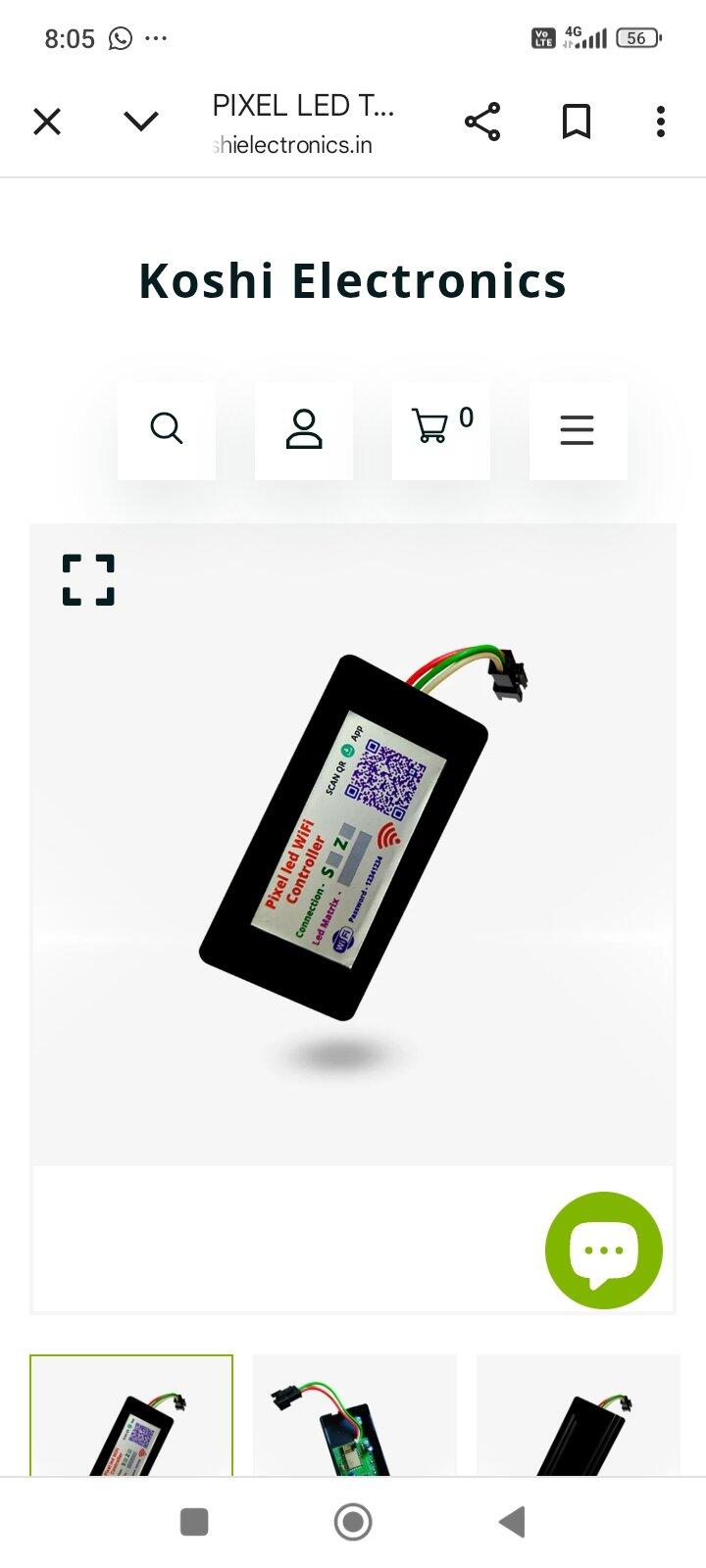
▶️ Watch: Pixel LED Multi-Language Multi-Size WiFi HD Controller Demo

📄 Overview
Built for pixel LED Thoran, gates and building decoration. This controller runs your Thoran animations AND writes your message on the same board — "Happy Birthday", "Happy Diwali", a name, anything — in any language, straight from your phone over WiFi. No SD card, no computer, no app to install. Works on any board size up to 2000 pixels: just enter your width and height in the control panel, so one controller fits many different Thoran and board sizes.
📋 Specifications
| Specification | Details |
|---|---|
| Control | WiFi from any Android or iPhone browser — no app installation |
| Network | Controller creates its own hotspot (W1000_MULTI_XXXX) — no internet or router needed |
| Maximum pixels | Up to 2000 LEDs |
| Matrix size | User-adjustable width x height, any combination within 2000 pixels |
| Supported LED ICs | WS2811 (RGB), WS2812 / WS2812B (GRB), UCS1903 (RGB) |
| Power input | 5V DC |
| Data output | 1 x addressable pixel data line |
| Languages | All languages incl. Hindi, English, Urdu, Arabic (RTL) & regional |
| Display modes | Text only / Text + Animations / Animations only |
| Border effects | 18 effects, clockwise or anti-clockwise, adjustable speed |
| Text styling | Any colour, background colour, rainbow mode, font style, size & position with live preview |
| Wiring layouts | S / Z type, any starting corner and start direction |
| Memory | Text and settings saved on the controller, restored automatically after power cut |
| Weight | Approx. 100 g |
| In the box | 1 x Pixel LED Multi-Language Multi-Size WiFi HD Controller |
| Warranty | 6 months seller warranty |
📖 User Manual
Live demo
Name + Animation on a 10X40 Thoran
This demo shows a name and the built-in animations on a 10X40 matrix. The same controller works on any size up to 2,000 pixels — just enter your width and height in the panel.
Complete user manual for the Pixel LED Multi-Language Multi-Size WiFi HD Controller. Set it up from your phone in about two minutes — no app to install, no SD card, no computer.
Watch first
Full video tutorial
Five steps
Quick start
1
Wire the boardConnect your pixel LED data line to the controller's data output, and 5V power to both the controller and the LED board.
2
Find the WiFiPower on. On your phone's WiFi list look for W1000_MULTI_ followed by four characters, for example W1000_MULTI_A3F2. Password: 12341234
3
Open the panelThe control panel usually opens by itself. If it does not, type 10.10.10.1 in your phone's browser.
4
Tell it your boardEnter your matrix width and height, then pick the wiring type. The controller restarts once — reconnect after a few seconds.
5
Type and sendEnter your message, choose colour, font and speed, then send. Your board updates in seconds.
Step 2 in detail
Connecting to the controller
| WiFi name | W1000_MULTI_XXXX |
| Default password | 12341234 |
| Panel address | 10.10.10.1 |
| Internet needed | No — the controller makes its own network |
The last four characters are unique to your controller. They come from its hardware address, so two controllers side by side never clash.
Change the password before an event. In Layout settings, set your own WiFi password (at least 8 characters) so guests cannot change your display. The controller restarts to apply it.
One-time setup
Telling it about your board
These five settings describe how your pixels are physically arranged. Set them once and every message and animation lines up correctly afterwards.
| Setting | Options | What it means |
|---|---|---|
| Matrix width & height | 1 – 2000 total | How many pixels across and down. Width × height must not exceed 2000. |
| Connection type | S TYPE / Z TYPE | S = each row snakes back the other way. Z = every row restarts from the same side. |
| Starting corner | TL / TR / BL / BR | The corner where your very first pixel sits. |
| Start direction | R / L / U / D | Which way the strip runs from that first pixel. |
| LED type | WS2811 (RGB) WS2812 (GRB) 1903 (RGB) |
Match your pixels. The wrong choice shows the right shapes in the wrong colours. |
Changing the matrix size restarts the controller. That is normal — it re-allocates memory for the new board. Wait a few seconds and reconnect to the WiFi.
The main switch
Three display modes
TEXT ONLY
Just your message
Your text scrolls continuously, nothing else. Best for shop name boards and notice boards.
TEXT + ANIMATIONS
Both, taking turns
Animations play, then your message scrolls, then animations again. The default, and what most Thoran users want.
ANIMATIONS ONLY
Pure decoration
Patterns run continuously with no text. Best for gate and building decoration.
Every text control
Writing your message
| Control | What it does |
|---|---|
| Input text | Your message. Any language — Hindi, English, Urdu, Arabic, Marathi, Gujarati, Tamil, Telugu, Bengali, Punjabi. Emojis work too. |
| Text direction | NORMAL TEXT for left-to-right, URDU / ARABIC for right-to-left scripts. |
| Font family | The typeface your message is drawn in. |
| Font style | Normal or bold. Bold reads better from a distance. |
| Font size | Letter height in pixels. Keep it a little under your board height. |
| Vertical position | Slides the text up or down so it sits exactly where you want it. |
| Text colour | Any colour from the picker. |
| Background colour | The colour behind the letters. Black leaves those pixels off. |
| Rainbow mode | Ignores the fixed colour and sweeps the letters through the spectrum as they scroll. |
| Scroll speed | How fast the message travels across the board. |
| Animation speed | How fast the patterns and effects play. |
| Brightness | Overall output. Lower it to reduce heat and current draw on big boards. |
Live preview. The panel shows your message exactly as it will appear on the board while you type, so you can fix size and position before sending.
18 effects plus off
Border effects
A border effect runs a moving light pattern around the outer edge of your board while your message plays inside it. Each one can run clockwise or anti-clockwise, at your chosen speed.
Tri-color Chase
Rainbow Chase
Red/White Dash
Blink Dots
Tricolor Flow
RGB Dashes
Red Comet
Color Flash
Indian Flag
B/W Dots
Gradient Chase
Red Dot
Green Dot
Blue Dot
Yellow Dot
Orange Dot
Cyan Dot
Magenta Dot
Tricolor Flow and Indian Flag are made for Independence Day and Republic Day. Red Comet and Gradient Chase suit weddings and Diwali. The single-colour dots are the quietest, good behind a busy message.
What people write
Message ideas
The Thoran stays up all year — only the message changes.
HAPPY DIWALI
शुभ दीपावली
HAPPY BIRTHDAY
HAPPY NEW YEAR
WELCOME
जन्मदिन की शुभकामनाएं
SHUBH VIVAH
HAPPY HOLI
OPEN
CONGRATULATIONS
If something looks wrong
Troubleshooting
The board stays completely dark
Check the 5V supply first. Confirm the data wire is on the controller's data output and that the LED board has its own power. Then check brightness is not at minimum.
Colours are wrong — red shows as green
The LED type is mismatched. Switch between WS2811 (RGB), WS2812 (GRB) and 1903 (RGB) until the colours are correct.
Text is broken up or rows run backwards
The wiring description does not match the board. Try the other connection type (S to Z), then check the starting corner and start direction.
Only part of the board lights up
The matrix width or height is smaller than the real board. Correct it in the panel — remember the controller restarts after a size change.
The pattern repeats instead of filling once
That is intentional. Animations are designed on a small block and tile across your board. A part-tile at the edge is trimmed rather than squashed.
The display flickers or dims on a large board
Almost always the power supply. Big boards at high brightness draw a lot of current — use a higher-rated 5V supply, inject power at both ends, or lower the brightness.
Settings vanished after a power cut
They should not — text and settings are stored on the controller and restore automatically. If they do not, send once more and check the supply is stable at switch-on.
Before you start
Safety and power
- Use 5V only. A higher voltage will damage the controller and the pixels. Check polarity before switching on.
- Size the supply to the board. The more pixels and the higher the brightness, the more current you need.
- Switch off at the mains before changing any wiring.
- Keep it dry. For outdoor Thoran and gate use, mount the controller in a weatherproof enclosure.
Koshi Electronics · Pixel LED Multi-Language Multi-Size WiFi HD Controller · 6 month seller warranty against manufacturing defects. Damage from incorrect voltage, reverse polarity, wrong wiring or physical damage is not covered.
❓ FAQs
Kya ye pixel LED Thoran par chalega?
Haan — zyada-tar customer isi ke liye lete hain. Ye aapki Thoran animation bhi chalata hai aur usi board par 'Happy Birthday' ya 'Happy Diwali' jaisa message bhi likh deta hai.
Kya animation aur text ek saath chal sakte hain?
Haan. Display mode me 3 option hain — TEXT ONLY, TEXT + ANIMATIONS, aur ANIMATIONS ONLY. Beech wala default hai, jisme animation aur aapka message baari-baari chalte hain.
Kitne LED tak chalega?
2000 pixel tak. Aap apni board ki width aur height panel me daal dete hain — jaise 50x40, 25x80 ya 20x20. Isliye ek hi controller alag-alag size ki Thoran aur board par chal jaata hai.
Kya isme SD card ya PC ki zaroorat hai?
Nahi. Poora control phone se WiFi par hota hai — na SD card chahiye, na computer. Seconds mein text update ho jaata hai.
App install karna padega?
Nahi. Controller apna khud ka WiFi banata hai. Usse connect karte hi control panel phone ke browser me khul jaata hai — Android aur iPhone dono par.
WiFi kis naam se aayega?
W1000_MULTI_ ke baad 4 character, jaise W1000_MULTI_A3F2. Default password 12341234 hai. Panel na khule to browser me 10.10.10.1 type karein. Password baad me apna set kar sakte hain.
Kaunse pixel LED support karta hai?
WS2811 (RGB), WS2812 / WS2812B (GRB) aur UCS1903 (RGB). Panel me ek baar apna LED type select kar lijiye. Galat select hone par rang badle hue dikhenge.
Kaunsa power supply lagega?
Controller 5V DC par chalta hai. LED board ke liye 5V supply lijiye jiska current aapke pixel count ke hisaab se ho — jitne zyada pixel aur jitni tez brightness, utna zyada current chahiye.
Kaunsi languages display kar sakta hai?
Sabhi — Hindi, English, Urdu, Arabic (right-to-left), Marathi, Gujarati, Tamil, Telugu, Bengali, Punjabi. Emoji bhi chalte hain.
Border effects kitne hain?
18 border effects hain — Rainbow Chase, Indian Flag, Tricolor Flow, Red Comet, Gradient Chase, alag-alag colour dots aur bhi. Har effect clockwise ya anti-clockwise, apni speed par chal sakta hai.
Light jaane ke baad kya hoga?
Aapka message aur settings controller me save rehte hain aur light aate hi apne aap wapas chalu ho jaate hain.
Warranty kitni hai?
6 mahine ki seller warranty, manufacturing defect ke liye. Galat voltage, ulti polarity, galat wiring ya physical damage cover nahi hota.